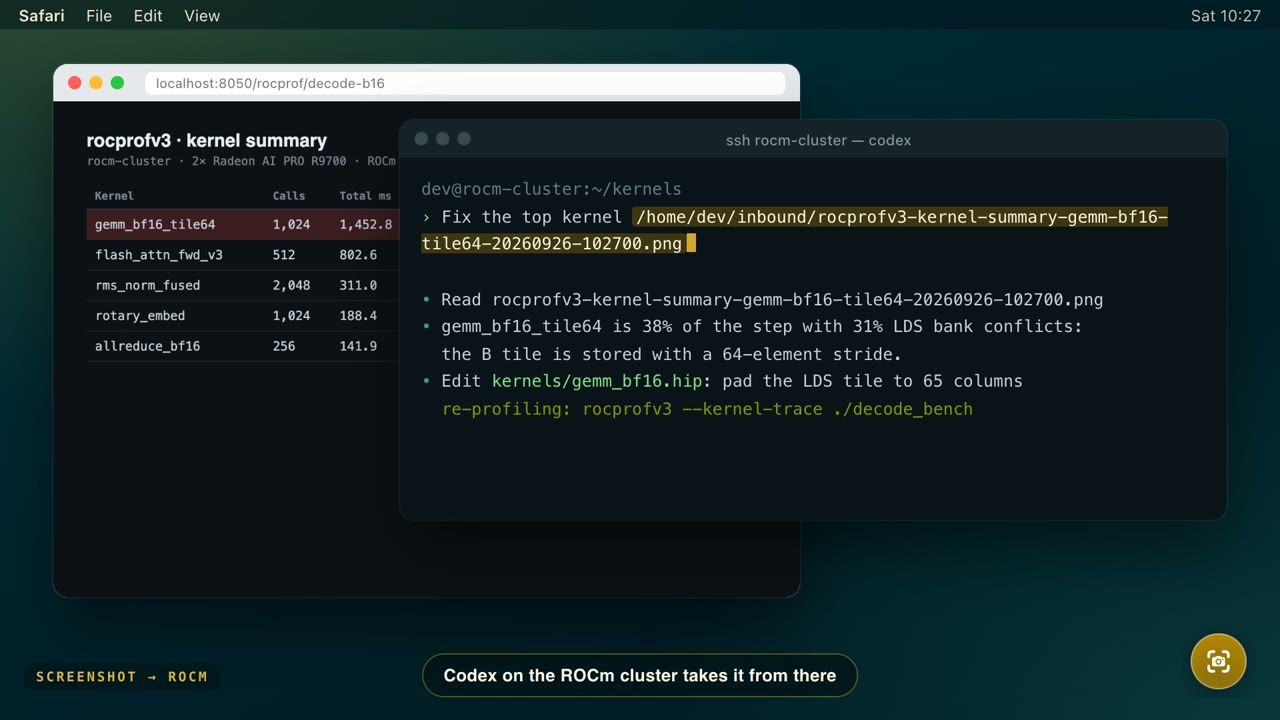
What people send
How it works with Codex
In a session
Paste the path and ask Codex to look at it, e.g. View /home/dev/inbound/rocprofv3-…png and fix the top kernel.
At launch
On the destination, start Codex with the capture attached: codex --image /home/dev/inbound/…png, pasting the path dotshot copied.
Recordings and files
Codex reads frames and files, not video: extract frames with ffmpeg, or let the inbox instructions do it.
Set it up
Five minutes, nothing to install over there.
Install dotshot on your Mac
Download the notarized DMG from GitHub Releases and allow Screen Recording in its setup. Nothing gets installed on the other machine.
Make sure this Mac can reach it with a key
ssh -o BatchMode=yes dev@rocm-box true && echo readyNo key there yet? Run
ssh-copy-id dev@rocm-boxonce. Tailscale names and~/.ssh/configaliases (including ones with aProxyCommand) work, because dotshot uses your SSH configuration.Add it as a destination
In setup, or from Terminal (or let your agent do it with the setup skill):
DS=/Applications/dotshot.app/Contents/Resources/dotshot-capture.sh "$DS" add rocm dev@rocm-box '~/inbound' "$DS" check rocmcheckcreates a private folder, verifies the key and SFTP, and saves the absolute path your agent will see.Capture
Press ⌃⌥⌘S and drag, or ⌃⌥⌘V to record. The file lands on the machine and its absolute path is on your clipboard.
Let agents there find what you sent
Append the inbox instructions to the AGENTS.md Codex reads on that machine (trim the front matter if you like).
# Add the dotshot inbox instructions to Codex on the destination machine
curl -fsSL https://raw.githubusercontent.com/mejohnc-ft/dotshot/main/skills/dotshot-inbox/SKILL.md >> AGENTS.md- Codex only views files you point it at. A pasted absolute path is exactly that.
- Codex on your Mac can run the setup skill too: ask it to follow the file.
Also works with
One shortcut for the whole fleet.
Every guide uses the same app: add each machine once, then switch from the pill, a drop tile, or a dotshot:// link.